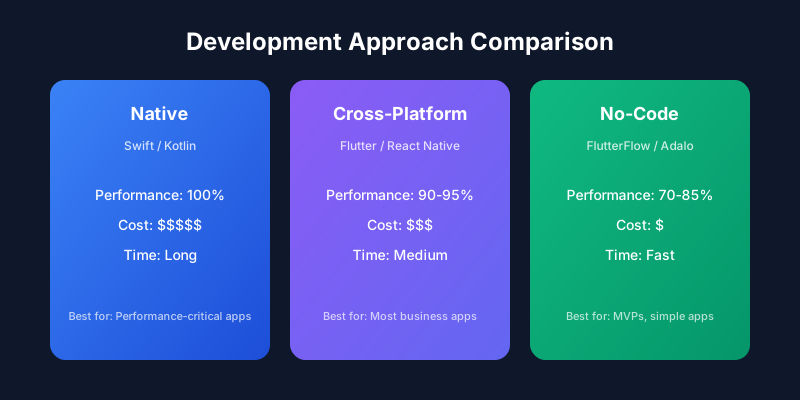
Choosing the right development approach can save you months of time and thousands in budget
The Three Approaches Explained
Native Development
Native apps are built specifically for one platform using platform-specific languages and tools.
// iOS Native Example (Swift)
import UIKit

class ViewController: UIViewController {
    override func viewDidLoad() {
        super.viewDidLoad()

        let button = UIButton(type: .system)
        button.setTitle("Tap Me", for: .normal)
        button.addTarget(self, action: #selector(buttonTapped), for: .touchUpInside)
        view.addSubview(button)
    }

    @objc func buttonTapped() {
        print("Button was tapped!")
    }
}
// Android Native Example (Kotlin)
class MainActivity : AppCompatActivity() {
    override fun onCreate(savedInstanceState: Bundle?) {
        super.onCreate(savedInstanceState)
        setContentView(R.layout.activity_main)

        val button = findViewById<Button>(R.id.myButton)
        button.setOnClickListener {
            Toast.makeText(this, "Button tapped!", Toast.LENGTH_SHORT).show()
        }
    }
}
Cross-Platform Development
Write once, deploy to both iOS and Android using frameworks like Flutter or React Native.
// Flutter Example
import 'package:flutter/material.dart';

class MyApp extends StatelessWidget {
  @override
  Widget build(BuildContext context) {
    return MaterialApp(
      home: Scaffold(
        appBar: AppBar(title: Text('My App')),
        body: Center(
          child: ElevatedButton(
            onPressed: () => print('Button tapped!'),
            child: Text('Tap Me'),
          ),
        ),
      ),
    );
  }
}
// React Native Example
import React from 'react';
import { View, Button, Alert } from 'react-native';

const App = () => {
  return (
    <View style={{ flex: 1, justifyContent: 'center' }}>
      <Button
        title="Tap Me"
        onPress={() => Alert.alert('Button tapped!')}
      />
    </View>
  );
};

export default App;
No-Code Development
Build apps visually without writing code using platforms like FlutterFlow, Adalo, or Bubble.
Head-to-Head Comparison
| factor | native | crossPlatform | noCode |
|---|---|---|---|
| Development Cost | $100K - $500K+ | $50K - $250K | $5K - $50K |
| Time to Market | 6-18 months | 3-9 months | 1-3 months |
| Performance | 100% | 90-95% | 70-85% |
| Platform Features | Full access | Most features | Limited |
| Maintenance Cost | High (2 codebases) | Medium (1 codebase) | Low |
| Team Required | iOS + Android devs | Flutter/RN devs | Non-technical |
When to Choose Each Approach
Choose Native When:
Native is Best For:
- ✓ Performance-critical apps (games, video editing, AR/VR)
- ✓ Apps requiring deep hardware integration (camera, sensors)
- ✓ Apps with complex animations and gestures
- ✓ Large enterprises with dedicated platform teams
- ✓ Apps where user experience is the primary differentiator
Real Examples: Instagram, Spotify, Airbnb (core features)
Choose Cross-Platform When:
Cross-Platform is Best For:
- ✓ Business apps, e-commerce, social platforms
- ✓ Startups needing to reach both platforms quickly
- ✓ Apps with moderate performance requirements
- ✓ Teams wanting code reuse across platforms
- ✓ Projects with limited budgets but quality requirements
Real Examples: Google Pay, BMW, Alibaba, eBay Motors
Choose No-Code When:
No-Code is Best For:
- ✓ MVPs and proof-of-concept apps
- ✓ Internal business tools
- ✓ Simple CRUD applications
- ✓ Non-technical founders testing ideas
- ✓ Rapid prototyping before full development
Real Examples: Many internal tools, simple booking apps, basic marketplaces
Performance Benchmarks
Cross-Platform Framework Comparison
| framework | language | performance | community | learning |
|---|---|---|---|---|
| Flutter | Dart | Excellent | Growing fast | Moderate |
| React Native | JavaScript | Good | Largest | Easy (if know React) |
| Kotlin Multiplatform | Kotlin | Excellent | Growing | Moderate |
| .NET MAUI | C# | Good | Enterprise | Moderate |
Flutter vs React Native Deep Dive
// Flutter: Compiled to native ARM code
// - Consistent UI across platforms (uses own rendering engine)
// - Hot reload for fast development
// - Single codebase, single language (Dart)
// - Great for custom, complex UIs

Widget build(BuildContext context) {
  return Container(
    decoration: BoxDecoration(
      gradient: LinearGradient(colors: [Colors.blue, Colors.purple]),
      borderRadius: BorderRadius.circular(20),
    ),
    child: Text('Custom styled component'),
  );
}
// React Native: Uses native components
// - Leverages existing JavaScript/React knowledge
// - Larger ecosystem and more packages
// - Uses platform-specific UI components
// - Better for web developers transitioning to mobile

const StyledComponent = () => (
  <LinearGradient colors={['blue', 'purple']} style={styles.container}>
    <Text>Custom styled component</Text>
  </LinearGradient>
);
Our Recommendation: For most business applications in 2025, we recommend Flutter for its superior performance, growing ecosystem, and consistent UI across platforms.
No-Code Platform Comparison
| platform | bestFor | pricing | exports |
|---|---|---|---|
| FlutterFlow | Professional apps | $30-70/mo | Flutter code |
| Adalo | Simple apps | $45-200/mo | Limited |
| Bubble | Web apps | $29-349/mo | No |
| Glide | Data-driven apps | $25-99/mo | No |
Decision Framework
No decision tree data available
The Verdict
Not sure which approach is right for your project?
Our team can analyze your requirements and recommend the best development strategy.
Get Expert Advice